<?xml version="1.0" encoding="utf-8"?><feed xmlns="http://www.w3.org/2005/Atom" ><generator uri="https://jekyllrb.com/" version="4.4.1">Jekyll</generator><link href="https://rhyn0bytes.net/feed.xml" rel="self" type="application/atom+xml" /><link href="https://rhyn0bytes.net/" rel="alternate" type="text/html" /><updated>2026-04-05T21:46:41+00:00</updated><id>https://rhyn0bytes.net/feed.xml</id><title type="html">rhyn0bytes Blog</title><subtitle>A collection of thoughts, insights, and experiences from Ryan, a software developer and technology enthusiast. Here, you&apos;ll find articles on programming, software development, and the latest trends in technology. Join me on this journey as I share my knowledge and passion for all things tech.</subtitle><entry><title type="html">Building a bare-bones local orchestration</title><link href="https://rhyn0bytes.net/posts/bare-bones-orchestration/" rel="alternate" type="text/html" title="Building a bare-bones local orchestration" /><published>2026-04-04T00:00:00+00:00</published><updated>2026-04-04T00:00:00+00:00</updated><id>https://rhyn0bytes.net/posts/bare-bones-orchestration</id><content type="html" xml:base="https://rhyn0bytes.net/posts/bare-bones-orchestration/"><![CDATA[<h2 id="the-end-goal">The End Goal</h2>

<p>Build out a very simple, auditable, and local example of how to orchestrate a workflow to help me generate new blog post ideas from my Joplin markdown notes. I want to keep the workflow tightly designed so that I can audit and understand each step of the workflow. I also want this to be a local tool that does not require outside access. Eventually, I will want to start adding tools that my tool can use, but I want to limit the blast radius for any unintended consequences.</p>

<p>I want to keep the model grounded in the retrieved notes and will provide some simple sterring prompts like suggested topic areas or known “blog series” that I want to produce. This prompt should return ranked suggestions for blog titles, outlines and what notes where found to support content for those posts.</p>

<h2 id="starting-with-the-basics">Starting with the basics</h2>

<p>At a high level, an <strong>agent orchestration</strong> is just a program that decides:</p>

<ol>
  <li>what the model should see,</li>
  <li>what tools it is allowed to use,</li>
  <li>when to call those tools,</li>
  <li>how to store memory or state,</li>
  <li>and when to stop.</li>
</ol>

<blockquote class="callout callout-info">
  <p>A workflow follows a known sequence: classify → retrieve documents → summarize → save result. An agent is more dynamic</p>
</blockquote>

<h3 id="the-mental-model">The mental model</h3>

<p>Think of a local agent as five layers stacked on top of each other.</p>

<h4 id="layer-1-the-model">Layer 1: the model</h4>

<p>This is the brain-shaped text engine, but not the whole system. Locally, that might be Ollama serving a model on your machine. Ollama now supports both tool calling and structured outputs, which matters because it lets the model either request a tool or produce JSON that your code can trust more than free-form prose.</p>

<h4 id="layer-2-the-tools">Layer 2: the tools</h4>

<p>A tool is just a function the model is allowed to invoke. It could read a file, search your notes, create a calendar event, run a shell command, or query a SQLite database. The model itself does not “have access” to anything unless you explicitly give it a tool.</p>

<h4 id="layer-3-the-orchestrator">Layer 3: the orchestrator</h4>

<p>This is the traffic cop. It decides what prompt goes to the model, whether tool calls are allowed, how results are fed back, how many retries are allowed, and when the process ends. <code class="language-plaintext highlighter-rouge">LangGraph</code>, for example, models this as a graph with shared state and nodes that read from and write to that state.</p>

<h4 id="layer-4-memorystate">Layer 4: memory/state</h4>

<p>This is where prior messages, tool outputs, task variables, or scratch data live. In <code class="language-plaintext highlighter-rouge">LangGraph</code>, short-term memory is treated as part of graph state and can be persisted with checkpoints.</p>

<h4 id="layer-5-the-data-boundary">Layer 5: the data boundary</h4>

<p>This is the part that I care about most. Which files can be read? Which folders are exposed? Which tools can write? Which logs are saved? Since I distrust cloud models (especially for security and privacy), this boundary matters more than the cleverness of the prompts.</p>

<p>At this point, you might be thinking “why not just use OpenClaw if you want an assistant or LangChain to build your own tools?”</p>

<p>Simply put, I do not trust OpenClaw and I would rather start super small and deepen my own understanding of how these things work. I am an engineer after all.</p>

<h2 id="code-vs-models">Code vs Models</h2>

<p>Writing my own orchestration will also let me dig in and let code do what <strong>code is good at</strong> and the model to what <strong>models are good at</strong>.</p>

<p>Code is good at:</p>

<ul>
  <li>validation</li>
  <li>branching</li>
  <li>permissions</li>
  <li>retries</li>
  <li>schemas</li>
  <li>persistence</li>
  <li>deterministic transforms</li>
</ul>

<p>Models are good at:</p>

<ul>
  <li>interpretation</li>
  <li>summarization</li>
  <li>classification</li>
  <li>drafting</li>
  <li>ranking fuzzy options</li>
  <li>extracting meaning from messy text</li>
</ul>

<h2 id="the-project-structure">The Project Structure</h2>

<div class="language-bash highlighter-rouge"><div class="highlight"><pre class="highlight"><code>local_blog_agent/
├── data/
│   ├── joplin_export/
│   ├── processed/
│   │   ├── notes.jsonl
│   │   ├── chunks.jsonl
│   │   └── tfidf_index.pkl
│   └── outputs/
│       ├── blog_ideas.json
│       └── blog_ideas.md
├── src/
│   ├── config.py
│   ├── ingest.py
│   ├── chunking.py
│   ├── retrieve.py
│   ├── prompts.py
│   ├── llm.py
│   ├── schemas.py
│   ├── pipeline.py
│   └── cli.py
├── requirements.txt
└── README.md
</code></pre></div></div>

<p>All of my notes are written in markdown and while not all of them include frontmater some of them will which makes my output structure remaining consistent so much more important.</p>

<p>A simple schema like:</p>

<div class="language-python highlighter-rouge"><div class="highlight"><pre class="highlight"><code><span class="kn">from</span> <span class="nn">pydantic</span> <span class="kn">import</span> <span class="n">BaseModel</span><span class="p">,</span> <span class="n">Field</span>
<span class="kn">from</span> <span class="nn">typing</span> <span class="kn">import</span> <span class="n">List</span>


<span class="k">class</span> <span class="nc">BlogIdea</span><span class="p">(</span><span class="n">BaseModel</span><span class="p">):</span>
    <span class="n">rank</span><span class="p">:</span> <span class="nb">int</span>
    <span class="n">title</span><span class="p">:</span> <span class="nb">str</span>
    <span class="n">angle</span><span class="p">:</span> <span class="nb">str</span>
    <span class="n">why_this_fits</span><span class="p">:</span> <span class="nb">str</span>
    <span class="n">target_audience</span><span class="p">:</span> <span class="nb">str</span>
    <span class="n">suggested_outline</span><span class="p">:</span> <span class="n">List</span><span class="p">[</span><span class="nb">str</span><span class="p">]</span>
    <span class="n">source_chunks</span><span class="p">:</span> <span class="n">List</span><span class="p">[</span><span class="nb">str</span><span class="p">]</span>
    <span class="n">confidence</span><span class="p">:</span> <span class="nb">float</span> <span class="o">=</span> <span class="n">Field</span><span class="p">(</span><span class="n">ge</span><span class="o">=</span><span class="mf">0.0</span><span class="p">,</span> <span class="n">le</span><span class="o">=</span><span class="mf">1.0</span><span class="p">)</span>


<span class="k">class</span> <span class="nc">BlogIdeasResponse</span><span class="p">(</span><span class="n">BaseModel</span><span class="p">):</span>
    <span class="n">ideas</span><span class="p">:</span> <span class="n">List</span><span class="p">[</span><span class="n">BlogIdea</span><span class="p">]</span>
</code></pre></div></div>

<p>Will force my response into a known shape and can validate against this shape to fail loudly if the output is junk.</p>

<h2 id="where-to-go-next">Where to go next</h2>

<p>Once I have validated that this tool is useful and generating predictable suggestions for blog ideas with a given steering prompt, I would like to generate multiple search queries from a giving steering topic.</p>]]></content><author><name></name></author><category term="orchestration" /><category term="ollama" /><category term="python" /><category term="ai" /><category term="joplin" /></entry><entry><title type="html">Two Resumes, No Lies</title><link href="https://rhyn0bytes.net/posts/resume-pipline-debugging-to-strategy/" rel="alternate" type="text/html" title="Two Resumes, No Lies" /><published>2026-03-24T00:00:00+00:00</published><updated>2026-03-24T00:00:00+00:00</updated><id>https://rhyn0bytes.net/posts/resume-pipline-debugging-to-strategy</id><content type="html" xml:base="https://rhyn0bytes.net/posts/resume-pipline-debugging-to-strategy/"><![CDATA[<p>Once the pipeline was finally stable, I hit the real question:</p>

<blockquote>
  <p>What do I want to say here, and how do I say it honestly?</p>
</blockquote>

<hr />

<h2 id="1-the-temptation">1. The Temptation</h2>

<p>When you’ve got AI helping out, it’s so easy to slip into things like:</p>

<ul>
  <li>Overstating experience</li>
  <li>Inflating scope</li>
  <li>Smoothing rough edges into fiction</li>
</ul>

<p>Especially when it comes to AI.</p>

<hr />

<h2 id="2-the-constraint-i-chose">2. The Constraint I Chose</h2>

<p>My official title is Principal Software Engineer.</p>

<p>But titles aren’t what matters to me. They don’t capture the impact or the real work I put in.</p>

<p>Target:</p>

<ul>
  <li>Staff / Senior+ IC roles</li>
  <li>Developer productivity teams</li>
  <li>AI enablement spaces</li>
  <li>Possibly education-focused AI</li>
</ul>

<p>Constraint:</p>

<blockquote>
  <p>Everything I include has to be true, defensible, and based on actual, shipped work.</p>
</blockquote>

<hr />

<h2 id="3-from-hype-to-systems-thinking">3. From Hype to Systems Thinking</h2>

<p>This shift wasn’t about lowering my ambitions.</p>

<p>It meant thinking differently about impact:</p>

<ul>
  <li>Systems over features</li>
  <li>Leverage over activity</li>
  <li>Direction over claims</li>
</ul>

<hr />

<p>💬 Not:</p>

<blockquote class="callout callout-warning">
  <p>“Built AI systems”</p>
</blockquote>

<p>But:</p>

<blockquote class="callout callout-tip">
  <p>“Improved systems where AI is becoming a multiplier”</p>
</blockquote>

<hr />

<h2 id="4-instead-of-one-resume-two">4. Instead of One Resume… Two</h2>

<p>I stopped chasing that one perfect version.</p>

<p>So I built two:</p>

<h3 id="conservative">Conservative</h3>

<ul>
  <li>Tight edits</li>
  <li>Minimal expansion</li>
  <li>Lower narrative risk</li>
</ul>

<h3 id="aggressive">Aggressive</h3>

<ul>
  <li>Stronger AI-forward framing</li>
  <li>Clearer directional intent</li>
  <li>Still grounded in the real work I’ve done</li>
</ul>

<hr />

<h2 id="5-why-this-works">5. Why This Works</h2>

<p>Because hiring isn’t binary.</p>

<p>Different companies optimize for different signals:</p>

<ul>
  <li>Some reward precision</li>
  <li>Some reward trajectory</li>
  <li>Some reward narrative clarity</li>
</ul>

<p>So instead of guessing what would resonate…</p>

<blockquote class="callout callout-tip">
  <p>I started testing positioning.</p>
</blockquote>

<hr />

<h2 id="6-the-mission-section">6. The Mission Section</h2>

<p>I added a new section:</p>

<blockquote>
  <p>AI in education as augmentation, not replacement.</p>
</blockquote>

<p>This does two things:</p>

<ol>
  <li>Signals a commitment to long-term direction</li>
  <li>Anchors my AI work in responsibility</li>
</ol>

<hr />

<h2 id="7-working-with-ai-without-losing-the-plot">7. Working With AI Without Losing the Plot</h2>

<p>The most helpful thing AI did wasn’t write for me.</p>

<p>It was:</p>

<ul>
  <li>Surfacing inconsistencies</li>
  <li>Stress-testing claims</li>
  <li>Generating structured alternatives</li>
</ul>

<blockquote class="callout callout-note">
  <p>💡 AI is best used as a reviewer and amplifier<br />
not a narrator of your experience</p>
</blockquote>

<hr />

<h2 id="8-what-changed-for-me">8. What Changed for Me</h2>

<p>Before:</p>

<ul>
  <li>Resume = static artifact</li>
  <li>Edit = one-shot decision</li>
</ul>

<p>After:</p>

<ul>
  <li>Resume = system with variants</li>
  <li>Edit = exploration space</li>
</ul>

<hr />

<h2 id="lessons-learned">Lessons Learned</h2>

<ol>
  <li>How you frame your story is just as important as the metrics you’ve achieved.</li>
  <li>Honesty outlasts hype, and real impact speaks for itself.</li>
  <li>Exploring multiple variants is more useful than chasing a single ‘perfect’ resume.</li>
  <li>AI works best as a collaborator, not a replacement.</li>
  <li>Where you’re headed matters as much as what you’ve done.</li>
</ol>

<hr />

<h2 id="what-id-do-next">What I’d Do Next</h2>

<ol>
  <li>Add diff tooling between variants</li>
  <li>Build a lightweight “resume lint” system</li>
  <li>Create targeted versions for:
    <ul>
      <li>Dev productivity teams</li>
      <li>Education AI companies</li>
    </ul>
  </li>
  <li>Start publishing small, real AI projects</li>
</ol>

<hr />

<h2 id="closing-thought">Closing Thought</h2>

<p>The hardest part wasn’t fixing the pipeline.</p>

<p>It was figuring out what story to tell once it actually worked.</p>

<blockquote class="callout callout-tip">
  <p>And making sure that story stayed true to what I’d actually accomplished.</p>
</blockquote>]]></content><author><name></name></author><category term="ai" /><category term="career" /><category term="engineering" /><summary type="html"><![CDATA[Once the pipeline was finally stable, I hit the real question:]]></summary></entry><entry><title type="html">The Pipeline Is the Product</title><link href="https://rhyn0bytes.net/posts/the-pipeline-is-the-product/" rel="alternate" type="text/html" title="The Pipeline Is the Product" /><published>2026-03-23T00:00:00+00:00</published><updated>2026-03-23T00:00:00+00:00</updated><id>https://rhyn0bytes.net/posts/the-pipeline-is-the-product</id><content type="html" xml:base="https://rhyn0bytes.net/posts/the-pipeline-is-the-product/"><![CDATA[<p>I started with what seemed like a simple resume tweak.</p>

<p>One bullet point included a percentage sign.
In the PDF, however, the sentence just <em>stopped</em>.</p>

<p>It wasn’t truncated or wrapped—just gone.</p>

<p>That’s usually a smell.</p>

<hr />

<h2 id="1-the-its-just-a-percent-sign-bug">1. The “It’s Just a Percent Sign” Bug</h2>

<p>My first instinct was correct:</p>

<blockquote>
  <p>LaTeX treats <code class="language-plaintext highlighter-rouge">%</code> as a comment.</p>
</blockquote>

<p>So, I escaped it, moved on, and thought I was done.</p>

<p>Except, I wasn’t done.</p>

<p>Escaping the percent sign <em>kind of</em> worked, but then the output started looking weird in other places.</p>

<p>That’s when it stopped being a simple formatting issue and revealed itself as a pipeline problem.</p>

<hr />

<h2 id="2-follow-the-pipeline-not-the-symptom">2. Follow the Pipeline, Not the Symptom</h2>

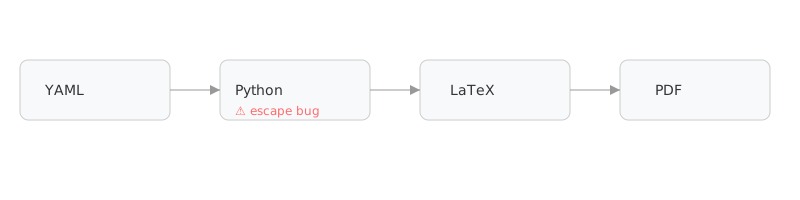
<p>The resume wasn’t just a LaTeX file; it was the product of a pipeline:</p>

<p><img src="/assets/images/resume/resume-pipeline.svg" alt="Resume pipeline diagram" /></p>

<hr />

<h2 id="3-the-real-bug-escaping-in-the-wrong-order">3. The Real Bug: Escaping in the Wrong Order</h2>

<p>The problem wasn’t <em>whether</em> the <code class="language-plaintext highlighter-rouge">%</code> symbol was escaped.</p>

<p>It was <em>when</em> backslashes were processed before percent signs, which meant:</p>

<ul>
  <li>Already escaped sequences got escaped again</li>
  <li>Output became corrupted in subtle ways</li>
</ul>

<h3 id="broken-old-order">Broken (old order)</h3>

<div class="language-python highlighter-rouge"><div class="highlight"><pre class="highlight"><code><span class="n">escape_backslashes</span><span class="p">()</span>
<span class="n">escape_percent</span><span class="p">()</span>
</code></pre></div></div>

<h3 id="fixed-new-order">Fixed (new order)</h3>

<div class="language-python highlighter-rouge"><div class="highlight"><pre class="highlight"><code><span class="n">preserve_existing_escapes</span><span class="p">()</span>
<span class="n">escape_percent</span><span class="p">()</span>
<span class="n">escape_remaining_sequences</span><span class="p">()</span>
</code></pre></div></div>

<p>Once I corrected the order:</p>

<ul>
  <li>Percentages rendered correctly</li>
  <li>Text stopped disappearing</li>
  <li>Output stabilized</li>
</ul>

<blockquote class="callout callout-note">
  <p>💡 If a formatting bug behaves inconsistently,
it’s probably a transformation-order bug.</p>
</blockquote>

<hr />

<h2 id="4-then-the-colors-broke">4. Then the Colors Broke</h2>

<p>The output was technically correct, but visually wrong.</p>

<p>It was flatter, with less contrast—not the same resume.</p>

<hr />

<h2 id="5-version-drift-is-a-silent-killer">5. Version Drift Is a Silent Killer</h2>

<p>Same template (moderncv). Different result.</p>

<p>Cause:</p>

<ul>
  <li>Dependency drift</li>
  <li>Theme defaults changed</li>
  <li>Color aliases resolved differently</li>
</ul>

<h3 id="the-fix-pin-everything">The Fix: Pin Everything</h3>

<div class="language-LaTeX highlighter-rouge"><div class="highlight"><pre class="highlight"><code><span class="k">\definecolor</span><span class="p">{</span>color1<span class="p">}{</span>HTML<span class="p">}{</span>3873B3<span class="p">}</span>
<span class="k">\definecolor</span><span class="p">{</span>color2<span class="p">}{</span>HTML<span class="p">}{</span>737373<span class="p">}</span>
</code></pre></div></div>

<hr />

<h2 id="6-one-more-bug-because-of-course">6. One More Bug (Because Of Course)</h2>

<p>The mission bullets no longer aligned with the rest of the layout.</p>

<p>Cause:</p>

<ul>
  <li>Used <code class="language-plaintext highlighter-rouge">\itemize</code></li>
  <li>which bypassed the moderncv layout system.</li>
</ul>

<p>Fix:</p>

<div class="language-LaTeX highlighter-rouge"><div class="highlight"><pre class="highlight"><code><span class="k">\cvlistitem</span><span class="p">{</span>...<span class="p">}</span>
</code></pre></div></div>

<p>Alignment was instantly restored.</p>

<hr />

<h2 id="7-what-this-actually-was">7. What This Actually Was</h2>

<p>This entire process started as:</p>

<blockquote>
  <p>Why is one sentence broken?</p>
</blockquote>

<p>But it became:</p>

<ul>
  <li>Pipeline debugging</li>
  <li>Transformation correctness</li>
  <li>Dependency control</li>
  <li>Layout system alignment</li>
</ul>

<hr />

<h2 id="lessons-learned">Lessons Learned</h2>

<ol>
  <li>Small bugs often point to system-level issues.</li>
  <li>The order of transformations matters more than the transformations themselves.</li>
  <li>Defaults are not stable contracts; they can change unexpectedly.</li>
  <li>Layout systems demand semantic consistency.</li>
</ol>

<h2 id="closing-thought">Closing Thought</h2>

<p>This wasn’t really about LaTeX.</p>

<blockquote>
  <p>The pipeline is a product.
Treat it like one.</p>
</blockquote>

<h2 id="up-next">Up Next</h2>

<p>In the next post, I’ll walk through what happened after the pipeline was fixed:</p>

<ul>
  <li>Rewriting the resume for Staff-level roles</li>
  <li>Working with AI without over-claiming experience</li>
  <li>Creating multiple narrative variants intentionally</li>
</ul>]]></content><author><name></name></author><category term="ai" /><category term="engineering" /><category term="debugging" /><summary type="html"><![CDATA[I started with what seemed like a simple resume tweak.]]></summary></entry><entry><title type="html">What Actually Changed: A Visual Walkthrough of an AI-Assisted Refactor</title><link href="https://rhyn0bytes.net/posts/what-actually-changed/" rel="alternate" type="text/html" title="What Actually Changed: A Visual Walkthrough of an AI-Assisted Refactor" /><published>2026-03-22T00:00:00+00:00</published><updated>2026-03-22T00:00:00+00:00</updated><id>https://rhyn0bytes.net/posts/what-actually-changed</id><content type="html" xml:base="https://rhyn0bytes.net/posts/what-actually-changed/"><![CDATA[<p>In the <a href="/posts/refactoring-without-losing-your-mind/">last post</a>, I talked about how to think about refactoring with AI:</p>

<ul>
  <li>define constraints</li>
  <li>stay disciplined</li>
  <li>iterate in small, testable steps</li>
</ul>

<p>That all sounds nice.</p>

<p>But what did it actually look like?</p>

<p>This is the visual version of that process—the messy middle included.</p>

<p>Each screenshot maps to a specific rule change, not just a visual tweak.</p>

<hr />

<h2 id="1-the-starting-point-systems-fighting-each-other">1. The Starting Point (Systems Fighting Each Other)</h2>

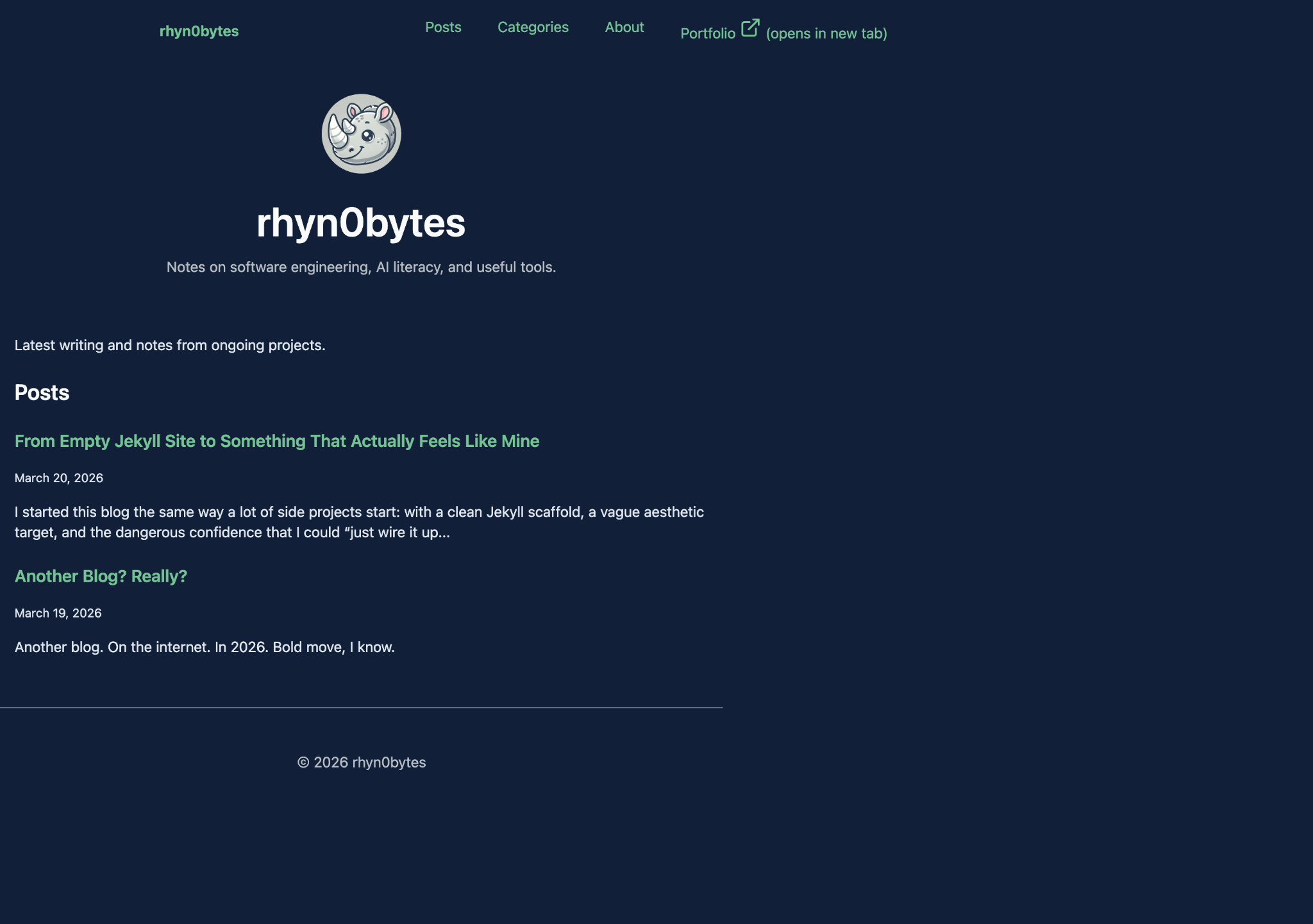
<p><img src="/assets/images/refactor/all-content-shifts-left-systems-are-fighting.png" alt="Left aligned layout with competing systems" /></p>

<p>At a glance, nothing looks obviously broken.</p>

<p>But everything is slightly off.</p>

<h3 id="what-was-actually-happening">What was actually happening:</h3>

<ul>
  <li>content is left-aligned instead of centered</li>
  <li>no consistent container width</li>
  <li>multiple style systems competing</li>
</ul>

<blockquote>
  <p>It looks fine… until you try to change anything.</p>
</blockquote>

<hr />

<h2 id="2-the-centered-illusion-debugging-with-a-centerline">2. The “Centered” Illusion (Debugging with a Centerline)</h2>

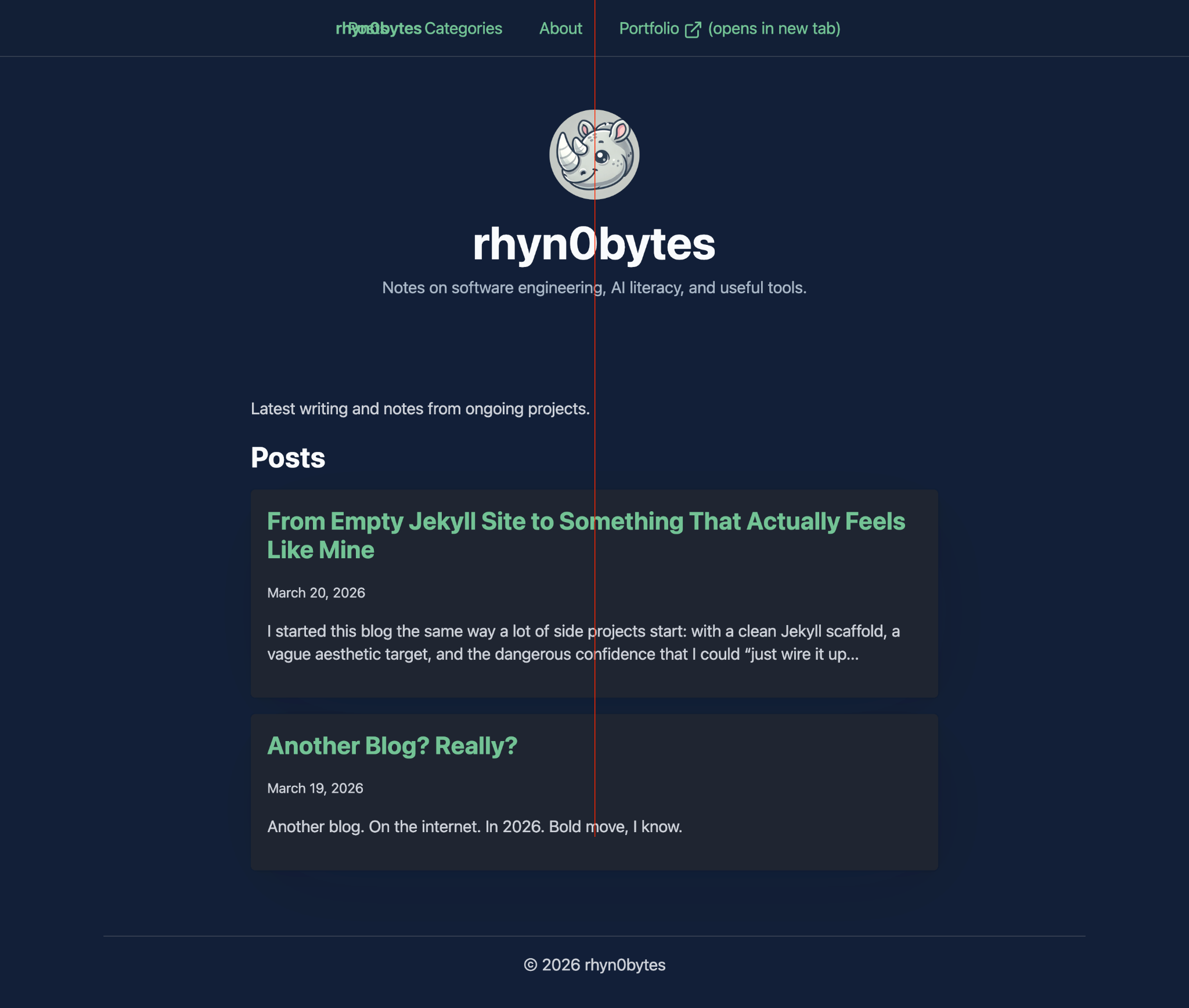
<p><img src="/assets/images/refactor/offset-discovered-after-adding-centerline.png" alt="Centerline debug revealing offset" /></p>

<p>I added a simple centerline overlay to verify alignment.</p>

<p>That’s when the illusion broke.</p>

<h3 id="what-this-revealed">What this revealed:</h3>

<ul>
  <li>the layout was not actually centered</li>
  <li>elements were visually “close enough,” but structurally wrong</li>
  <li>spacing drifted across sections</li>
</ul>

<blockquote>
  <p>If you can’t prove it’s centered, it probably isn’t.</p>
</blockquote>

<hr />

<h2 id="3-mid-refactor-reality-progress-and-new-problems">3. Mid-Refactor Reality (Progress… and New Problems)</h2>

<p><img src="/assets/images/refactor/centered-now-but-nav-styling-busted.png" alt="Centered content but broken nav" /></p>

<p>At this stage:</p>

<ul>
  <li>content was finally centered</li>
  <li>layout rules were starting to stabilize</li>
</ul>

<p>…but the navigation was clearly off.</p>

<p>The breakage was useful: it proved the new layout model was actually taking control, and exposed the assumptions that had been hidden in older styles.</p>

<h3 id="what-changed">What changed:</h3>

<ul>
  <li>a real container model emerged</li>
  <li>spacing became more predictable</li>
</ul>

<h3 id="what-broke">What broke:</h3>

<ul>
  <li>nav alignment</li>
  <li>header consistency</li>
</ul>

<blockquote>
  <p>This is where most refactors fall apart.</p>
</blockquote>

<hr />

<h2 id="4-the-system-locks-in-everything-becomes-predictable">4. The System Locks In (Everything Becomes Predictable)</h2>

<p><img src="/assets/images/refactor/home-page-after-full-refactor.png" alt="Clean centered homepage layout" /></p>

<p>Once the layout model was fully defined:</p>

<ul>
  <li>max-width was consistent</li>
  <li>margins were intentional</li>
  <li>components aligned naturally</li>
</ul>

<p>No more fighting the system.</p>

<blockquote>
  <p>The layout stopped being a collection of fixes and became a set of rules.</p>
</blockquote>

<hr />

<h2 id="5-what-made-this-work">5. What Made This Work</h2>

<p>These screenshots show the output.</p>

<p>They don’t show the most important part:</p>

<ul>
  <li>constraints defined before changes</li>
  <li>small, surgical patches</li>
  <li>constant validation against real output</li>
</ul>

<p>Validation happened at three levels: rendered output, spacing behavior by breakpoint, and contrast/accessibility checks.</p>

<p>Without that, this would have turned into:</p>

<blockquote>
  <p>“It looked better… until it didn’t.”</p>
</blockquote>

<p>If you want to copy this process: define non-negotiables first, then only accept patches that preserve them.</p>

<hr />

<h2 id="closing-thought">Closing Thought</h2>

<p>The goal wasn’t to make it look right.</p>

<p>The goal was to make it <strong>stay right</strong>.</p>

<p>And that only happened once the system was clear—both to me, and to the AI helping me implement it.</p>

<p>Clear constraints turned AI from a suggestion engine into a reliable implementation layer.</p>]]></content><author><name></name></author><category term="ai" /><category term="engineering" /><category term="refactoring" /><summary type="html"><![CDATA[A visual walkthrough of an AI-assisted refactor, from subtle layout drift to a stable, predictable system built through constraints, small patches, and constant validation.]]></summary></entry><entry><title type="html">Refactoring With AI Without Losing Your Mind</title><link href="https://rhyn0bytes.net/posts/refactoring-without-losing-your-mind/" rel="alternate" type="text/html" title="Refactoring With AI Without Losing Your Mind" /><published>2026-03-21T00:00:00+00:00</published><updated>2026-03-21T00:00:00+00:00</updated><id>https://rhyn0bytes.net/posts/refactoring-without-losing-your-mind</id><content type="html" xml:base="https://rhyn0bytes.net/posts/refactoring-without-losing-your-mind/"><![CDATA[<p>Refactoring a system is already dangerous.</p>

<p>Refactoring a system <strong>with AI in the loop</strong>?</p>

<p>That can either be a superpower… or a fast track to chaos.</p>

<p>After working through a full layout and styling refactor on this blog, I started to notice a pattern—not just in what worked, but in what <em>kept me from completely losing the thread</em> halfway through.</p>

<p>This isn’t a post about “AI made this easy.”</p>

<p>It didn’t.</p>

<p>This is about how to <em>work with AI deliberately</em> so you don’t create something your future self hates.</p>

<hr />

<h2 id="1-the-trap-letting-ai-lead-the-architecture">1. The Trap: Letting AI Lead the Architecture</h2>

<p>The easiest mistake to make is also the most tempting:</p>

<blockquote>
  <p>“Here’s my code. Improve it.”</p>
</blockquote>

<p>AI will happily:</p>

<ul>
  <li>rename things</li>
  <li>restructure files</li>
  <li>introduce new abstractions</li>
  <li>suggest patterns that <em>look</em> cleaner</li>
</ul>

<p>And suddenly…</p>

<p>You’re no longer refactoring.</p>

<p>You’re <strong>rewriting</strong>—without a clear mental model of what changed.</p>

<p>That’s where things break down:</p>

<ul>
  <li>styles drift</li>
  <li>layout assumptions conflict</li>
  <li>debugging becomes guesswork</li>
  <li>your “simple change” becomes a multi-hour spiral</li>
</ul>

<hr />

<h2 id="2-the-shift-you-own-the-model-ai-executes">2. The Shift: You Own the Model, AI Executes</h2>

<p>The turning point for me was simple:</p>

<blockquote>
  <p>Stop asking AI what to do. Start telling it what you’ve already decided.</p>
</blockquote>

<p>Before touching code, I had to answer:</p>

<ul>
  <li>What is my <strong>layout model</strong>?</li>
  <li>Where is the <strong>source of truth</strong> for spacing and width?</li>
  <li>What is <strong>mobile-first</strong> actually enforcing here?</li>
  <li>What <em>must not change</em>?</li>
</ul>

<p>Only after that did AI become useful.</p>

<p>Instead of:</p>

<blockquote>
  <p>“Fix my layout”</p>
</blockquote>

<p>I moved to:</p>

<blockquote>
  <p>“Act as a CSS/layout debugger. Identify the current model, then propose the <em>minimum</em> changes required to center the reading canvas.”</p>
</blockquote>

<p>That one constraint changed everything.</p>

<hr />

<h2 id="3-the-real-superpower-constraint-driven-iteration">3. The Real Superpower: Constraint-Driven Iteration</h2>

<p>AI is incredible at operating within constraints.</p>

<p>But you have to <em>give it constraints</em>.</p>

<p>The most effective loop I found looked like this:</p>

<h3 id="step-1-snapshot-reality">Step 1: Snapshot Reality</h3>

<ul>
  <li>Current source files</li>
  <li>Generated output (in my case, Jekyll build)</li>
  <li>Screenshots of actual rendering</li>
</ul>

<h3 id="step-2-force-reconciliation">Step 2: Force Reconciliation</h3>

<p>Ask AI to:</p>

<ul>
  <li>reconcile HTML + CSS + output</li>
  <li>identify the <em>actual</em> layout system in play</li>
</ul>

<p>Not what we <em>think</em> is happening.</p>

<p>What <em>is</em> happening.</p>

<h3 id="step-3-demand-surgical-changes">Step 3: Demand Surgical Changes</h3>

<p>Not:</p>

<blockquote>
  <p>“Refactor this”</p>
</blockquote>

<p>But:</p>

<blockquote>
  <p>“Propose the minimum patch set required to achieve X”</p>
</blockquote>

<h3 id="step-4-apply-incrementally">Step 4: Apply Incrementally</h3>

<ul>
  <li>Patch 1–3 files</li>
  <li>Rebuild</li>
  <li>Validate visually</li>
  <li>Repeat</li>
</ul>

<p>This prevented the classic AI failure mode:</p>

<blockquote class="callout callout-warning">
  <p><strong>Warning</strong>
“Everything changed, and I don’t know why.”</p>
</blockquote>

<h3 id="what-this-looked-like-in-practice">What This Looked Like In Practice</h3>

<p>In this blog refactor, constraints were not abstract. They were specific:</p>

<ul>
  <li>keep semantic HTML</li>
  <li>go mobile-first</li>
  <li>move to a token-first theme model</li>
  <li>hit WCAG AA contrast in both light and dark modes</li>
</ul>

<p>A few moments made the value of this process obvious:</p>

<ul>
  <li>
    <p><strong>Theme drift prevention:</strong>
We added a repeatable contrast check workflow instead of relying on visual guesses.</p>
  </li>
  <li>
    <p><strong>UI regression recovery:</strong>
Mobile nav looked better after a pass, but accidentally occluded page content when opened.
Fixing it was straightforward because scope stayed tight: remove the global overlay, keep panel-level separation, re-test.</p>
  </li>
  <li>
    <p><strong>Scope discipline:</strong>
We intentionally deferred connect page changes to a separate pass instead of folding it into every other layout change.
That kept the main refactor understandable and reviewable.</p>
  </li>
  <li>
    <p><strong>Layout sanity over cleverness:</strong>
We removed overlapping style assumptions, normalized spacing rules, and made behavior explicit by breakpoint.</p>
  </li>
</ul>

<p>None of that is flashy, but that is exactly the point.
The trust in AI went up as the constraints got tighter, not looser.</p>

<hr />

<h2 id="35-the-execution-layer-working-directly-in-the-code-with-copilot">3.5. The Execution Layer: Working Directly in the Code with Copilot</h2>

<p>Everything above describes the <em>thinking model</em>.</p>

<p>But the execution layer matters just as much. This is where the feedback loop lives.</p>

<p>One of the biggest accelerators in this process was shifting into a workflow where AI could operate directly on the codebase, not just through chat.</p>

<p>Using Copilot with GPT-5.3 in VS Code changed the feedback loop in two important ways:</p>

<h3 id="planning-mode--agent-mode">Planning Mode → Agent Mode</h3>

<p>The flow became:</p>

<ol>
  <li><strong>Planning Mode</strong>
    <ul>
      <li>Define constraints</li>
      <li>Clarify intent</li>
      <li>Break work into scoped changes</li>
    </ul>
  </li>
  <li><strong>Agent Mode</strong>
    <ul>
      <li>Apply changes directly to the code</li>
      <li>Navigate files automatically</li>
      <li>Execute multi-step edits without losing context</li>
    </ul>
  </li>
</ol>

<p>This removed a major source of friction:</p>

<blockquote class="callout callout-warning">
  <p><strong>Warning</strong>
Copy → paste → modify → re-run → repeat</p>
</blockquote>

<p>Instead, iteration became:</p>

<blockquote class="callout callout-tip">
  <p><strong>Pro Tip</strong>
Think → constrain → apply → validate</p>
</blockquote>

<h3 id="why-this-worked">Why This Worked</h3>

<p>The key difference wasn’t just speed.</p>

<p>It was <strong>context continuity</strong>.</p>

<p>Because the AI could:</p>

<ul>
  <li>see the actual file structure</li>
  <li>follow imports and dependencies</li>
  <li>modify multiple files in one pass</li>
</ul>

<p>…it stopped behaving like a suggestion engine and started behaving like a <strong>constrained executor</strong>.</p>

<h3 id="the-important-caveat">The Important Caveat</h3>

<p>This only worked because the constraints were already defined.</p>

<p>Without that, agent mode becomes dangerous very quickly:</p>

<ul>
  <li>large, unfocused changes</li>
  <li>unintended side effects across files</li>
  <li>loss of architectural clarity</li>
</ul>

<p>In other words:</p>

<blockquote class="callout callout-warning">
  <p><strong>Warning</strong>
Agent mode amplifies your system.</p>

  <p>If your thinking is clear, it accelerates you.
If your thinking is fuzzy, it magnifies the chaos.</p>
</blockquote>

<h3 id="the-net-effect">The Net Effect</h3>

<p>This shift dramatically shortened the feedback cycle:</p>

<ul>
  <li>faster iteration</li>
  <li>fewer context resets</li>
  <li>tighter alignment between intent and implementation</li>
</ul>

<p>But it didn’t replace the core loop.</p>

<p>It just made it <em>faster to execute the same disciplined loop</em>.</p>

<p>The discipline still came first.</p>

<hr />

<h2 id="4-maintainability-is-the-only-metric-that-matters">4. Maintainability Is the Only Metric That Matters</h2>

<p>It’s easy to get something that <em>looks right</em>.</p>

<p>That’s not the goal.</p>

<p>The goal is:</p>

<blockquote>
  <p>Can I come back in 3 months and understand this in 30 seconds?</p>
</blockquote>

<p>That forced a few principles:</p>

<ul>
  <li>
    <p><strong>No overlapping layout systems</strong>
(Water.css + Pico + custom overrides = pain)</p>
  </li>
  <li>
    <p><strong>Semantic HTML first, styling second</strong></p>
  </li>
  <li>
    <p><strong>Single source of truth for layout width</strong></p>
  </li>
  <li>
    <p><strong>Kill cleverness early</strong></p>
  </li>
</ul>

<p>If something felt “kind of magical,” it was probably a future bug.</p>

<hr />

<h2 id="5-ai-is-a-force-multiplier-for-discipline-not-a-replacement">5. AI Is a Force Multiplier for Discipline (Not a Replacement)</h2>

<p>AI didn’t remove the need to think.</p>

<p>It made <em>lack of thinking</em> more dangerous.</p>

<p>When used well, it becomes:</p>

<ul>
  <li>a second set of eyes</li>
  <li>a fast iteration engine</li>
  <li>a way to validate assumptions</li>
</ul>

<p>When used poorly, it becomes:</p>

<ul>
  <li>a chaos generator</li>
  <li>a source of silent complexity</li>
  <li>a confidence trap</li>
</ul>

<hr />

<h2 id="6-what-id-do-again-and-what-i-wouldnt">6. What I’d Do Again (and What I Wouldn’t)</h2>

<h3 id="i-would">I would:</h3>

<ul>
  <li>Start with constraints before code</li>
  <li>Treat AI as a debugger, not a designer</li>
  <li>Work in small, validated patches</li>
  <li>Continuously compare source vs output</li>
</ul>

<h3 id="i-would-not">I would not:</h3>

<ul>
  <li>Accept large, multi-file rewrites blindly</li>
  <li>Mix design systems without a clear boundary</li>
  <li>Assume AI understands my intent without explicitly stating it</li>
</ul>

<hr />

<h2 id="7-the-meta-takeaway">7. The Meta Takeaway</h2>

<p>The most valuable shift wasn’t technical.</p>

<p>It was mental:</p>

<blockquote>
  <p>I stopped collaborating with AI like a peer, and started directing it like a system.</p>
</blockquote>

<p>That’s when it became reliable.</p>

<hr />

<h2 id="whats-next">What’s Next</h2>

<p>I’m planning to document this process more visually:</p>

<ul>
  <li>before/after layout diagrams</li>
  <li>CSS cascade breakdowns</li>
  <li>“what changed vs what I thought changed”</li>
</ul>

<p>Because the real lesson here isn’t about CSS.</p>

<p>It’s about how to think clearly while moving fast with AI—
whether that AI is in a chat window or directly modifying your code.</p>

<p>And that’s a skill that’s only going to matter more.</p>]]></content><author><name></name></author><category term="ai" /><category term="engineering" /><category term="refactoring" /><summary type="html"><![CDATA[Refactoring with AI is only safe when you stay in control: define constraints first, make small validated changes, and use AI as a disciplined executor instead of an architectural decision-maker.]]></summary></entry><entry><title type="html">From Empty Jekyll Site to Something That Actually Feels Like Mine</title><link href="https://rhyn0bytes.net/posts/building-this-blog/" rel="alternate" type="text/html" title="From Empty Jekyll Site to Something That Actually Feels Like Mine" /><published>2026-03-20T00:00:00+00:00</published><updated>2026-03-20T00:00:00+00:00</updated><id>https://rhyn0bytes.net/posts/building-this-blog</id><content type="html" xml:base="https://rhyn0bytes.net/posts/building-this-blog/"><![CDATA[<p>I started this blog the same way a lot of side projects start: with a clean Jekyll scaffold, a vague aesthetic target, and the dangerous confidence that I could “just wire it up in an afternoon.”</p>

<p>The early version was intentionally simple. I added Water.css, got a basic layout in place, and had pages rendering quickly. It worked. It was readable. It was also generic in exactly the way a first pass usually is.</p>

<p>Then the real work started.</p>

<h2 id="the-shift-from-site-exists-to-site-has-structure">The shift from “site exists” to “site has structure”</h2>

<p>The first meaningful improvement was URL and content structure.</p>

<p>I wanted posts to live under a dedicated namespace instead of hanging off root-level routes, so I moved to a /posts/:title/ pattern. It seems small, but this is one of those decisions that quietly pays off later. Your URLs become more predictable, your content model is clearer, and your site starts to feel like an actual publication instead of a pile of pages.</p>

<p>From there, discovery became the next concern. I didn’t just want writing to exist, I wanted it to be browsable. Categories became the primary organizing system, and I initially explored manual category pages before switching to plugin-based generation for scale. Manual pages are fine at first; they become friction as soon as you stop having “just a few posts.”</p>

<p>That pivot was one of the bigger themes of this build: moving from “works now” to “still works after I publish 50 more posts.”</p>

<h2 id="homepage-semantics-not-just-styling">Homepage semantics, not just styling</h2>

<p>Once structure was solid, I reworked the homepage to show a real post feed: latest entries, short summaries, semantic markup, and cleaner separation of concerns between content and layout.</p>

<p>I learned (again) that presentation logic dumped into markdown gets messy fast. Moving feed rendering into the layout gave me cleaner templates, better semantics, and fewer weird rendering edge cases.</p>

<p>This site stopped feeling like a static landing page and started behaving more like a blog.</p>

<h2 id="developer-experience-matters-on-a-solo-blog-too">Developer experience matters on a solo blog too</h2>

<p>I spend enough time in code blocks that syntax highlighting quality was non-negotiable. So I integrated Rouge styles with both light and dark variants, and then documented lexer/language support so future me doesn’t have to rediscover what’s already available.</p>

<p>I also added styled markdown callouts for notes, warnings, and tips. This was one of those tiny quality-of-life upgrades that disproportionately improved readability. The first version looked too much like default blockquotes, so it got refined until callouts were visually distinct without feeling loud.</p>

<p>There’s a pattern here: almost nothing was “one and done.” Most things got better on the second or third pass.</p>

<h2 id="visual-identity-the-site-finally-got-a-face">Visual identity: the site finally got a face</h2>

<p>The masthead was where the blog started to feel personal.</p>

<p>I added a home-only hero section with a gradient treatment and profile image, then refactored it to be config-driven instead of hardcoded. That gave me flexibility to adjust tone and messaging without touching layout code every time.</p>

<p>Navigation went through multiple iterations too. Fixed versus sticky behavior, mobile dropdown readability, spacing, contrast, active-state clarity. These weren’t dramatic redesigns. They were small, cumulative improvements that made the interface feel intentional.</p>

<h2 id="the-part-no-one-posts-screenshots-of-production-debugging">The part no one posts screenshots of: production debugging</h2>

<p>The hardest part wasn’t writing templates. It was making local and production behave the same.</p>

<p>At one point, the site looked right locally but wrong after deploy. The only way through was to stop guessing and compare generated artifacts directly: built HTML, compiled CSS, live output, and asset URLs.</p>

<p>That surfaced real issues:</p>

<ul>
  <li>stale CSS from caching</li>
  <li>mobile viewport quirks caused by 100vw breakout techniques</li>
  <li>layout regressions introduced while fixing another responsive issue</li>
  <li>route-specific wrapper differences that affected spacing on posts vs home</li>
</ul>

<p>Each fix was straightforward in isolation. Together, they were a good reminder that frontend systems fail at the seams, not usually in the obvious center of a component.</p>

<h2 id="what-this-process-actually-changed">What this process actually changed</h2>

<p>By the end, I didn’t just have a prettier theme. I had a blog foundation that is:</p>

<ul>
  <li>structurally cleaner (URL and archive model)</li>
  <li>easier to extend (config-driven sections and plugin-backed archives)</li>
  <li>more readable (semantic feed, callouts, code styling)</li>
  <li>more stable across breakpoints and routes</li>
  <li>less fragile in production (cache strategy and artifact-level validation)</li>
</ul>

<p>In other words: less “demo,” more “system.”</p>

<h2 id="final-thought">Final thought</h2>

<p>I started with an empty Jekyll site and a CSS framework. I ended up with something that feels authored, not assembled.</p>

<p>Most of the value came from iteration, not from any single big feature. Small choices around structure, semantics, and debugging discipline compounded into a site I actually want to keep publishing on.</p>

<p>And honestly, that was the goal the whole time.</p>]]></content><author><name></name></author><category term="jekyll" /><category term="css frameworks" /><category term="design system" /><summary type="html"><![CDATA[I started this blog the same way a lot of side projects start: with a clean Jekyll scaffold, a vague aesthetic target, and the dangerous confidence that I could “just wire it up in an afternoon.”]]></summary></entry><entry><title type="html">Another Blog? Really?</title><link href="https://rhyn0bytes.net/posts/another-blog/" rel="alternate" type="text/html" title="Another Blog? Really?" /><published>2026-03-19T00:00:00+00:00</published><updated>2026-03-19T00:00:00+00:00</updated><id>https://rhyn0bytes.net/posts/another-blog</id><content type="html" xml:base="https://rhyn0bytes.net/posts/another-blog/"><![CDATA[<p>Another blog. On the internet. In 2026.</p>

<p>Bold move, I know.</p>

<p>There are already thousands (millions?) of engineers writing about code, architecture, and (most recently) AI. So why add another voice to the noise?</p>

<p>Because I think we’re missing the point.</p>

<h2 id="1-not-another-look-what-i-built-in-5-minutes-post">1. Not Another “Look What I Built in 5 Minutes” Post</h2>

<p>If you’ve been anywhere near tech content lately, you’ve seen it:</p>

<blockquote>
  <p>I vibe-coded this app in 20 minutes with AI.</p>
</blockquote>

<p>Or</p>

<blockquote>
  <p>Look at this startup I built over a weekend.</p>
</blockquote>

<p>Cool. Honestly, the tooling is incredible, but most of that content stops at the novelty.</p>

<p>What I’m interested in is something deeper:</p>

<blockquote>
  <p>What happens when AI is in the hands of an experienced engineer?</p>
</blockquote>

<p>Not just someone prompting their way to a demo, but someone who understands systems, tradeoffs, debugging, performance, and long-term maintainability.</p>

<p>Someone who knows what <em>should</em> be built, not just what <em>can</em> be built.</p>

<p>That’s where things actually get interesting.</p>

<p>That’s what this blog is about.</p>

<h2 id="2-why-jekyll-again">2. Why Jekyll (Again)</h2>

<p>Yes, I’m using Jekyll again.</p>

<p>Not because it’s trendy (it’s not), but because it’s comfortable. I work in Ruby every day, and there’s something nice about a tool that gets out of your way and lets you write.</p>

<figure class="highlight"><pre><code class="language-bash" data-lang="bash"><span class="c">#!/bin/bash</span>
bundle <span class="nb">exec </span>jekyll serve</code></pre></figure>

<p>That’s it. No platform lock-in. No algorithm deciding if this post is worth showing to people.</p>

<p>Just files, version control, and a system I fully understand.</p>

<p>And importantly, it gives me flexibility.</p>

<p>Since I can completely control the layout, styles, and have been writing using markdown for years. I can quickly and easily generate code blocks with syntax highlighting (using Rogue) and also easily add callouts like this:</p>

<blockquote class="callout callout-note">
  <p><strong>Note</strong>
This is an informational note.</p>
</blockquote>

<blockquote class="callout callout-tip">
  <p><strong>Pro Tip</strong>
Share helpful advice here.</p>
</blockquote>

<blockquote class="callout callout-warning">
  <p><strong>Warning</strong>
Call out a potential issue.</p>
</blockquote>

<blockquote class="callout callout-danger">
  <p><strong>Danger</strong>
Use for critical alerts.</p>
</blockquote>

<p>This isn’t just a place for code snippets or quick takes. It’s a space where I can:</p>

<ul>
  <li>Write longer-form thoughts</li>
  <li>Explore ideas over time</li>
  <li>Revisit and refine older posts</li>
  <li>Actually own what I publish</li>
</ul>

<h2 id="3-bringing-the-past-forward">3. Bringing the Past Forward</h2>

<p>I’ve written a lot over the years—scattered across notes, repos, half-finished drafts, and probably a few places I’ve forgotten about.</p>

<p>Part of this reboot is pulling all of that forward.</p>

<p>Not as-is, but refined. Updated. Recontextualized.</p>

<p>Think of this as a living archive, not just a stream of new posts.</p>

<h2 id="4-a-real-writing-cadence-finally">4. A Real Writing Cadence (Finally)</h2>

<p>I’m not going to promise “one post a week” or anything rigid like that.</p>

<p>But I am committing to writing consistently.</p>

<p>Not just when something is shiny or new, but when something is worth thinking through.</p>

<p>Not noise. Signal. (I promise to limit these clichés)</p>

<h2 id="5-what-you-can-expect">5. What You Can Expect</h2>

<p>This blog will focus on:</p>

<ul>
  <li>The intersection of AI and experienced engineering</li>
  <li>Practical insights, not just demos</li>
  <li>Systems thinking in an AI-accelerated world</li>
  <li>The stuff that doesn’t fit into a tweet or a quick post</li>
</ul>

<p>Sometimes that might include code:</p>

<figure class="highlight"><pre><code class="language-ruby" data-lang="ruby"><span class="k">def</span> <span class="nf">print_hi</span><span class="p">(</span><span class="nb">name</span><span class="p">)</span>
<span class="nb">puts</span> <span class="s2">"Hi, </span><span class="si">#{</span><span class="nb">name</span><span class="si">}</span><span class="s2">"</span>
<span class="k">end</span>

<span class="n">print_hi</span><span class="p">(</span><span class="s1">'Tom'</span><span class="p">)</span>
<span class="c1">#=&gt; prints 'Hi, Tom' to STDOUT.</span></code></pre></figure>

<p>But more often, it’ll be about <em>why</em> the code matters, and what changes when the tools evolve.</p>

<h2 id="final-thought">Final Thought</h2>

<p>The barrier to building has dropped dramatically.</p>

<p>That’s a good thing.</p>

<p>But the gap between building something and building something that lasts?</p>

<p>That gap might actually be getting wider.</p>

<p>Anyone can build faster now.</p>

<p>Fewer people are thinking deeper.</p>

<p>That’s the gap I want to explore.</p>

<hr />

<p>If you’ve made it this far—thanks for reading.</p>

<p>Let’s see where this goes and build things that last.</p>]]></content><author><name></name></author><category term="jekyll" /><category term="update" /><category term="writing process" /><summary type="html"><![CDATA[Another blog. On the internet. In 2026. Bold move, I know.]]></summary></entry></feed>