Ten Years of a Family Wish List App: What Finally Made It Stick
Categories: side projects, mobile, ai, product
Almost ten years ago I built a wish list exchange for my family. Since then it has come back three or four times, in four different tech stacks.
What finally made it stick wasn’t the stack. It was where I started, and what I decided to stop making people do by hand.
The problem that never changed
My family no longer lives anywhere near each other, not the same city and not the same state. We still gather in one place for Christmas, and we wanted a clean, friendly way to swap gift ideas beforehand.
That is the whole reason this project keeps coming back. The need never went away, so neither did the app.
Four lives in ten years
- Life 1: a simple .NET web app
- Life 2: Rails, the longest-running version
- Life 3: a React single page app with the API split out
- Life 4: today, with native iOS and Android apps plus browser extensions
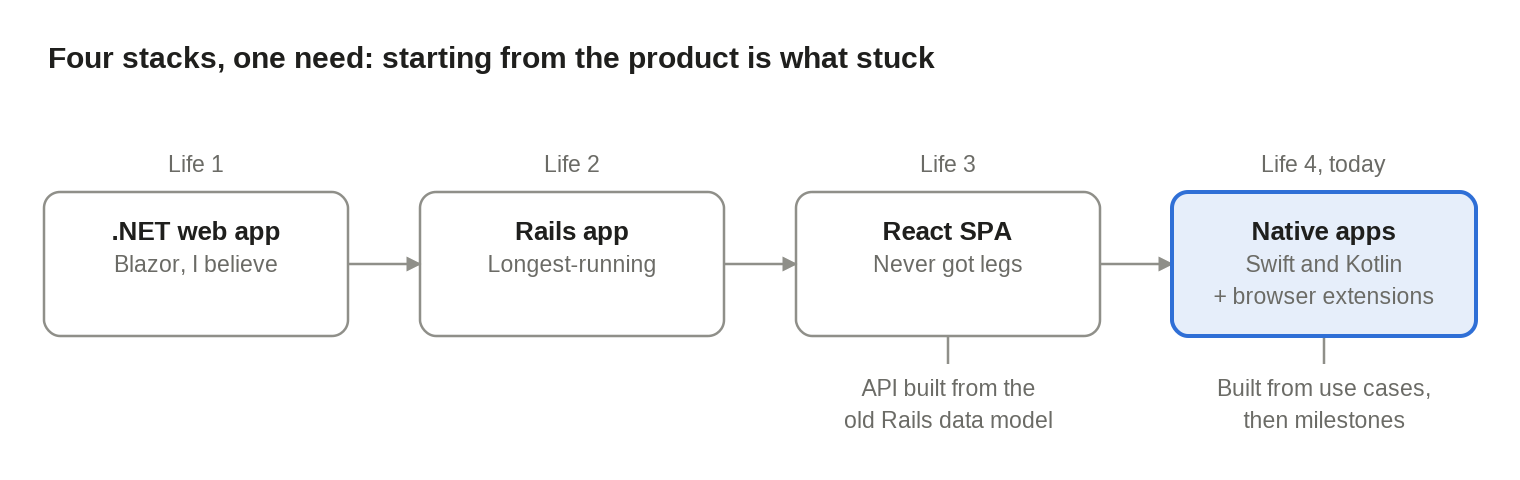
The need stayed the same through all four lives. The React split copied the Rails data model; this version started from use cases instead.
Why the React rewrite failed
I tried to make the API headless, hoping a React Native app would come along as its pair. Worse, I defined the data model from the existing, long-running Rails app. I was designing around what already existed instead of what my family needed. That set the whole project up to fail before I wrote much code.
Lesson Don’t shape a new system around the old system’s data model, or around a client you only hope to build later.
Starting from the product this time
This rebirth began from the product side. I listed the required use cases, then narrowed them into reasonable milestones: list creation, item management, family member invites, and so on.
Nothing about the stack was decided until I knew what the app needed to do.
Going native, on purpose
I started with a React Native app, which made me more comfortable working in the mobile space. But I wasn’t really fluent in React Native, Swift, or Kotlin.
So on a greenfield project I asked: why not take the time to start in the native languages, and build familiarity as I go? I had Claude Code scaffold the projects, Swift for iOS and Kotlin for Android. That gave me a jump start I never got with React Native.
Shockingly, Claude Code nailed this first pass for both native apps. We had already established the Rails REST endpoints for the web app, and the Claude Code session correctly interpreted them for a base level of functionality.
The scaffold launched right away and offered basic list management. It authenticated correctly with the API using the long-lived JWT support I had added, and it built all of the JSON-rendered endpoint variants the native apps needed. It even added a new tab I never explicitly asked for. It read the web app’s “reserve for purchase” and “mark as purchased” features as needing a “shopping” tab that narrows the view to just the items someone has reserved.
The only real steering I did for this alpha build was iterating on the app review and release process in the app stores. The documentation for how to do that, especially for a net-new app, is fairly limited.
Killing the tedious part
CRUD isn’t fun, and the most painful moment is building out a list: finding something online or in a store, then copying every detail by hand.
My first instinct was to scrape item details, starting with a known set of stores like Amazon, Target, and Best Buy. That went badly. Traditional scraping was hard because of how those stores render their final item pages, and building for a short list of stores was too narrow anyway.
The fix was to stop scraping from the outside. The browser extension and the share feature in the native apps read the final rendered content in the user’s own browser session, not a headless browser. Open any store, tap the extension or share a link, and the item becomes a list entry, ready to post.
Both the browser extension and the share extension in the native apps scan the rendered page for the details a proper list item needs: a name, a picture, and the link. You get a small form with those filled in, pick a list, and save.
The biggest win is capturing the link automatically, so every item points back to the exact page it came from. The browser extension still struggles to find the price, so for now that field is optional and you can type it in if it’s missing.
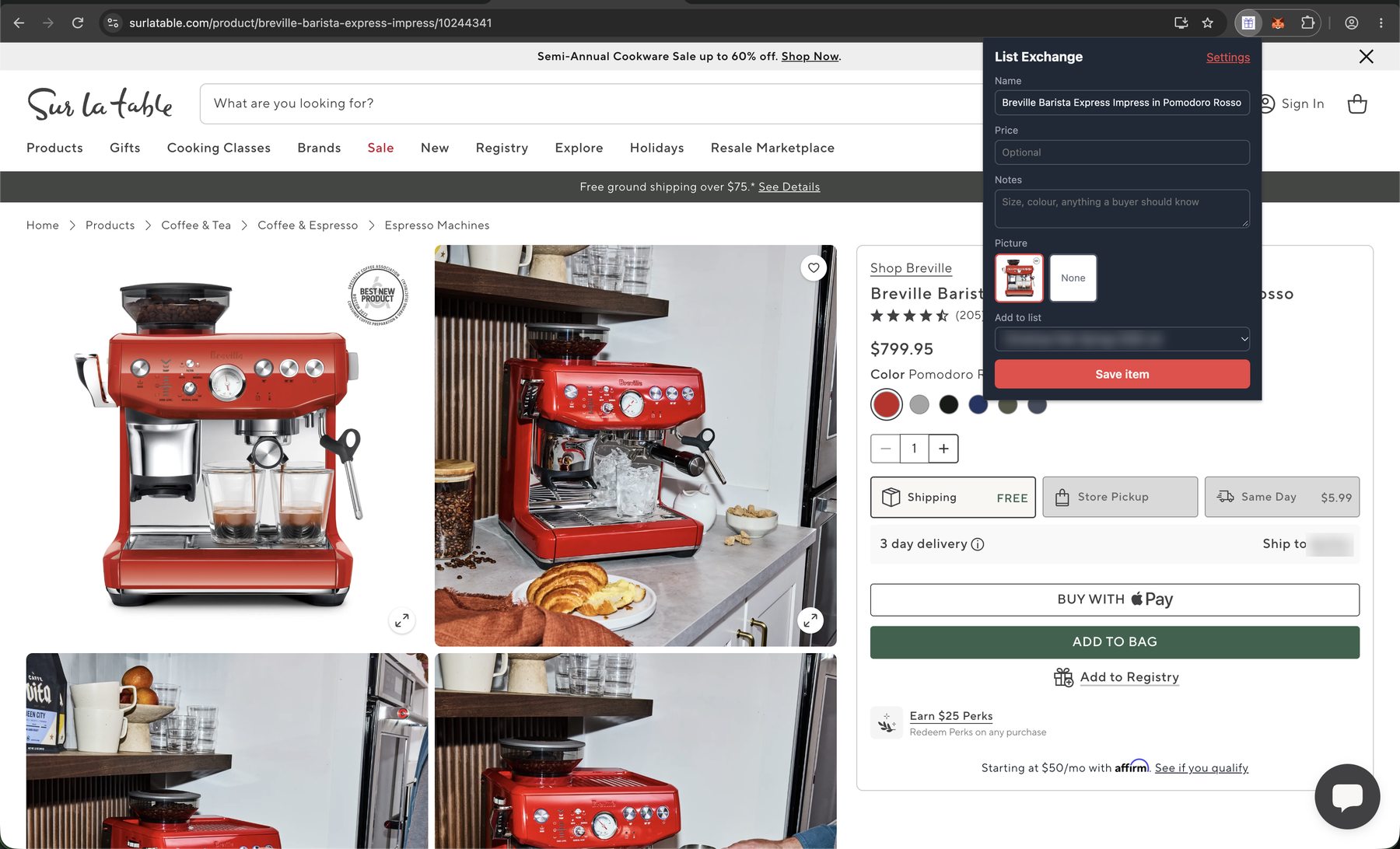 The browser extension on a store product page: name and picture filled in, price optional, then pick a list and save.
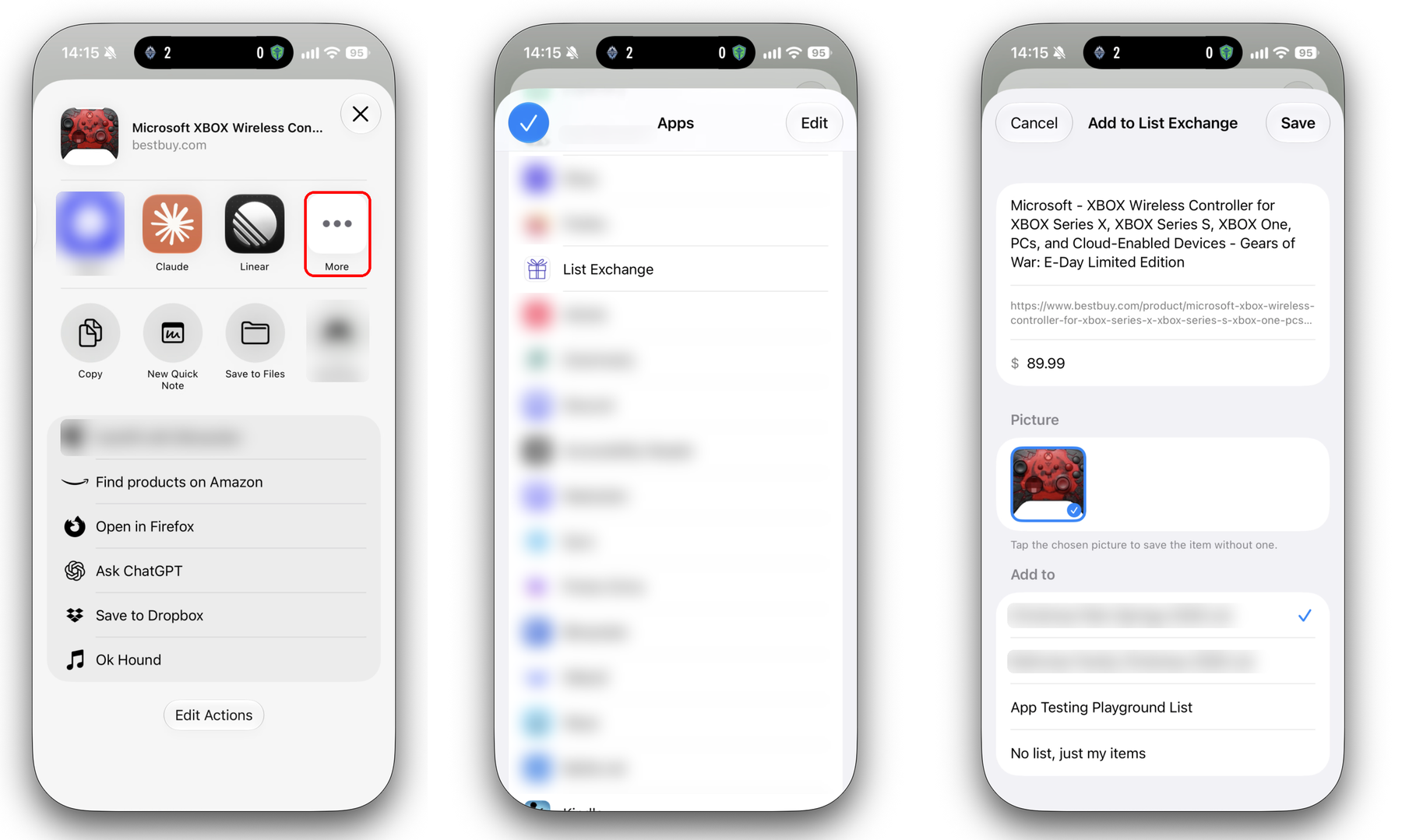 The same idea on iOS: share a link, pick List Exchange, and the item arrives filled in with the link, price, and picture.
Lessons learned
- Start from use cases, not from the old data model.
- Don’t design an API around a client you hope to build someday.
- Meet the content where it’s already rendered instead of fighting to scrape it.
- If you’re not fluent in the options, learn in the platform you’ll end up in, and let the project be the classroom.
Up next
The goal is to get this in front of the whole family for Christmas 2026. I’ll write more build notes as I go, including a deeper look at the browser extension and at scaffolding native apps with Claude Code.